Making Tax Digital for Landlords: Quarterly Updates, Thresholds and Penalties
Making Tax Digital for Income Tax has applied to landlords with qualifying income over £50,000 since April 2026, and the threshold falls to £30,000 in 2027. Who's in scope, how qualifying income is worked out from gross rent, the quarterly update deadlines and the new penalty points.

Quick answer: Making Tax Digital for Income Tax has been mandatory since 6 April 2026 for landlords and sole traders whose qualifying income was over £50,000 in the 2024 to 2025 tax year. You keep digital records and send HMRC a quarterly update four times a year, by 7 August, 7 November, 7 February and 7 May, then submit your tax return from the same software by 31 January. The threshold drops to £30,000 from April 2027 and £20,000 from April 2028. There are no penalties for a missed quarterly update in the 2026 to 2027 tax year, but from 2027 to 2028 each missed deadline earns a penalty point and four points mean a £200 penalty.
The first Making Tax Digital quarterly update was due on 7 August 2026, and HMRC said more than 864,000 sole traders and landlords were in scope. The second deadline, 7 November 2026, is the first one many landlords will meet having already been through the process once. This guide explains who has to use Making Tax Digital, how qualifying income is worked out for rental property, what the quarterly cycle looks like, and how the new penalty points work.
Who has to use Making Tax Digital for Income Tax?
According to HMRC's guidance on who needs to use Making Tax Digital for Income Tax, you're in scope if all of these apply:
- you're a sole trader or a landlord registered for Self Assessment
- you get income from self-employment, property, or both
- your qualifying income is above the threshold for the relevant tax year
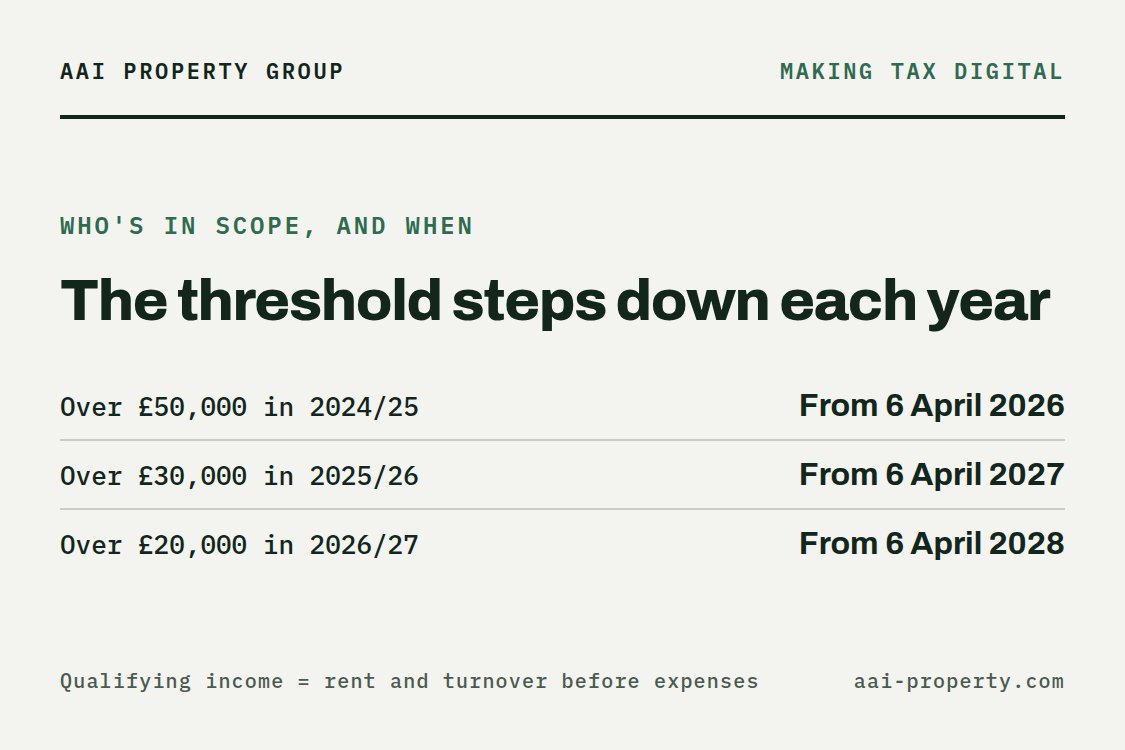
The threshold steps down over three years, and each step is based on an earlier tax return:
| Qualifying income over | In the tax year | Making Tax Digital from |
|---|---|---|
| £50,000 | 2024 to 2025 | 6 April 2026 |
| £30,000 | 2025 to 2026 | 6 April 2027 |
| £20,000 | 2026 to 2027 | 6 April 2028 |
HMRC reviews each Self Assessment return and writes to you if your qualifying income is over the threshold. A missing letter doesn't take you out of scope: checking is still your responsibility. Partnerships will join later on a timetable HMRC hasn't set yet, and some people can get an exemption, for example if they're digitally excluded.
How is qualifying income worked out for landlords?
This is the part landlords most often get wrong. Qualifying income is your total income from self-employment and property before expenses, in other words your gross rent and turnover, not your profit. HMRC's page on working out your qualifying income gives an example: £25,000 of rental income plus £27,000 of self-employment income makes £52,000 of qualifying income, which is over the £50,000 threshold.
A landlord with modest profits can therefore still be in scope. A portfolio letting for £3,000 a month has £36,000 of gross rent a year, which is above the £30,000 threshold that applies from April 2027, however much of it goes on mortgage interest, repairs and agent fees.
- Jointly owned property: only your share counts. If you and a sibling split £50,000 of rent equally, your qualifying income is £25,000. If you only receive your share after expenses have been deducted, HMRC uses that figure.
- Foreign property: if you're UK tax resident, rental income from property abroad counts too.
- What doesn't count: employment income under PAYE, dividends (including from your own company), pensions, your share of partnership profits, and income from UK REITs or property authorised investment funds.
Property held in a limited company is outside Making Tax Digital for Income Tax, because the company pays corporation tax instead. That's one more factor in the company versus personal ownership question we look at in our UK landlord tax guide.
What do you have to send, and when?

Once you're signed up, you keep digital records of your rental income and expenses in software that works with Making Tax Digital, and you send HMRC a quarterly update four times a year. The update deadlines are the same for everyone:
| Deadline | What's due |
|---|---|
| 7 August 2026 | First quarterly update for 2026 to 2027 |
| 7 November 2026 | Second quarterly update |
| 31 January 2027 | 2025 to 2026 Self Assessment return, filed the usual way |
| 7 February 2027 | Third quarterly update |
| 7 May 2027 | Fourth quarterly update |
| 31 January 2028 | 2026 to 2027 tax return, submitted from your Making Tax Digital software |
Two points are easy to miss. First, the tax return for the year before you joined still goes in the old way, so landlords who started in April 2026 file their 2025 to 2026 return as usual by 31 January 2027. Second, the quarterly updates don't replace the tax return: you still make a final submission after the year ends, and the payment deadline stays 31 January. HMRC's quarterly updates timeline sets the dates out in one place.
If you want to see what your rental profit means for your tax bill before the return is due, our income tax calculator works out the tax on salary plus rental profit.
How do Making Tax Digital penalties work?
Making Tax Digital comes with a new penalty system that replaces the old late filing and late payment penalties for your personal tax return. HMRC's guidance on penalties for Making Tax Digital for Income Tax sets out how it works.
Late quarterly updates and returns: penalty points
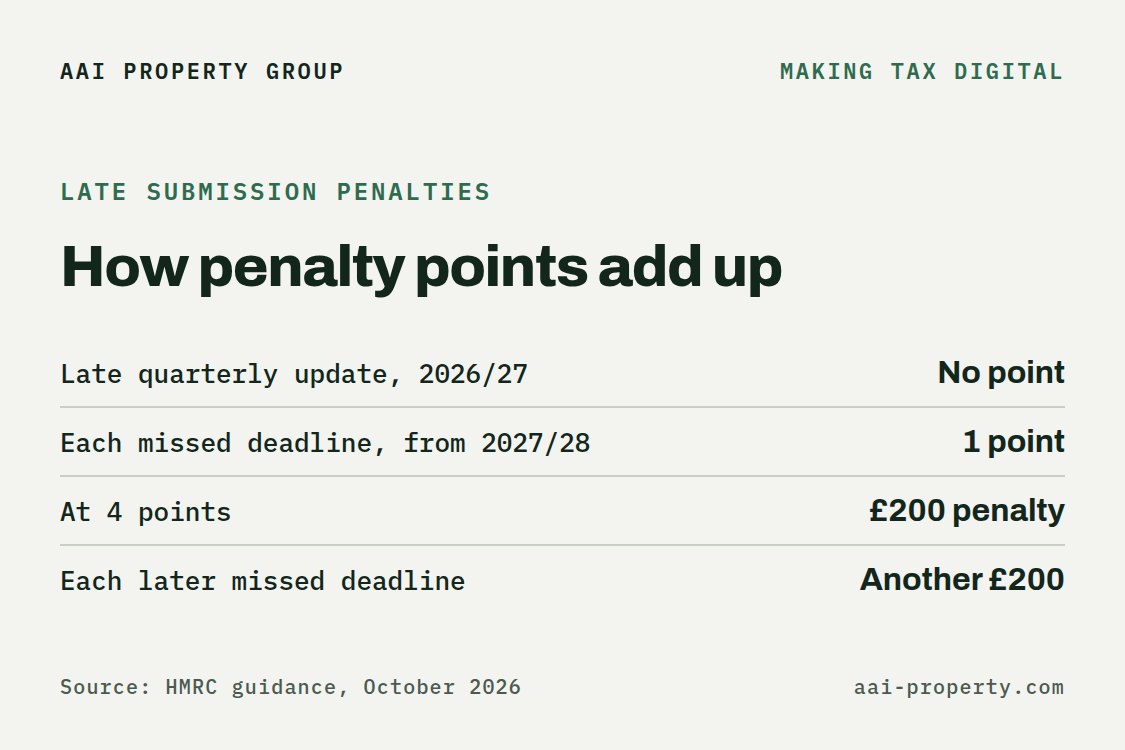
- 2026 to 2027 tax year: there are no penalties for missing a quarterly update deadline. You still have to send the updates before you can submit your tax return.
- From 2027 to 2028: each missed quarterly update deadline earns one penalty point. A late tax return earns a point in every year.
- The threshold is 4 points. Reaching it triggers a £200 penalty, and another £200 for each further missed deadline.
- You only get one point per deadline, even if you have several businesses and send more than one update late.
- Below the threshold, each point expires 24 months after the missed deadline. Once you reach 4 points, they only clear after 12 months of on-time submissions and once any outstanding updates and returns from the previous 24 months are sent.
Late payment penalties
Late payment penalties now grow with how long the tax stays unpaid. In your first year of the new rules you have 30 days after the due date to pay in full or agree a payment plan before a penalty applies. After that it's 15 days. For the 2026 to 2027 tax year, a payment 31 days or more late costs 3% of the tax owed at day 15 and another 3% at day 30, plus a yearly rate of 10% on the outstanding amount from day 31. For 2027 to 2028 the two charges rise to 4% each.
What should landlords do now?
- Check your gross rent, not your profit. Add up your rent before expenses for 2025 to 2026. If it's over £30,000, you'll need Making Tax Digital from 6 April 2027.
- Pick software early. Choose software that works with Making Tax Digital and get into the habit of recording income and expenses as they happen, not at year end.
- Diary the four dates. 7 August, 7 November, 7 February and 7 May. There are no points for a late update this tax year, which makes it the right year to build the routine.
- Talk to your accountant about who sends the updates and how jointly owned property is split.
Making Tax Digital doesn't change how much tax you pay. The bigger change for landlords is the separate property income tax rates of 22%, 42% and 47% (24%, 44% and 49% under the Budget 2026 plan, subject to Finance Bill 2026-27) from April 2027, which we cover in our guide to the 2027 landlord tax rise.
Frequently Asked Questions
Does Making Tax Digital apply to all landlords?
No. It applies to landlords and sole traders registered for Self Assessment whose qualifying income is over the threshold: £50,000 from April 2026, £30,000 from April 2027 and £20,000 from April 2028. Property owned through a limited company is outside it.
Is qualifying income my rent or my profit?
Your rent. Qualifying income is your total self-employment and property income before expenses, based on your tax return for the earlier year.
What happens if I miss the 7 November deadline?
For the 2026 to 2027 tax year there's no penalty for a missed quarterly update, but you still have to send it before you can submit your tax return. From 2027 to 2028, each missed deadline earns a penalty point.
How much is the Making Tax Digital late submission penalty?
£200, once you reach 4 penalty points, and another £200 for each missed deadline after that.
Do I still file a Self Assessment tax return?
Yes. Your first year in Making Tax Digital still ends with a tax return, submitted from your software by 31 January. The return for the year before you joined is filed the usual way.
Key Takeaways
- Making Tax Digital for Income Tax applies from 6 April 2026 to landlords and sole traders with qualifying income over £50,000.
- Qualifying income is gross rent and turnover before expenses, so a landlord with modest profits can still be in scope.
- The threshold falls to £30,000 from April 2027 and £20,000 from April 2028.
- Quarterly updates are due by 7 August, 7 November, 7 February and 7 May, with the tax return still due by 31 January.
- No penalties for late quarterly updates in 2026 to 2027. From 2027 to 2028, 4 penalty points mean a £200 penalty.
This article is general information about Making Tax Digital for Income Tax in the UK, not tax advice. Thresholds, deadlines and penalties are taken from HMRC guidance as at October 2026 and can change. Check your own position with HMRC or a qualified accountant.